Recently I came across this feature that provides a good use case to work on a different record from a related record form. I mean you can now literally edit the value on a related record without even navigating away from the opened related record. We originally only had Quick View forms that we could render for a lookup field which was read only.
So how is this done?
We will take the above example – Bookable resource booking record has a lookup field referencing associated Work Order record. So, the Work Order form is rendered on the Bookable Resource Booking form.
- Firstly, we create a new main form in the Work Order entity. This form will be rendered on the parent record.
- Copy the Form ID after creating the main form above. You can do this from the address bar URL on the form editor in both new and old editor –
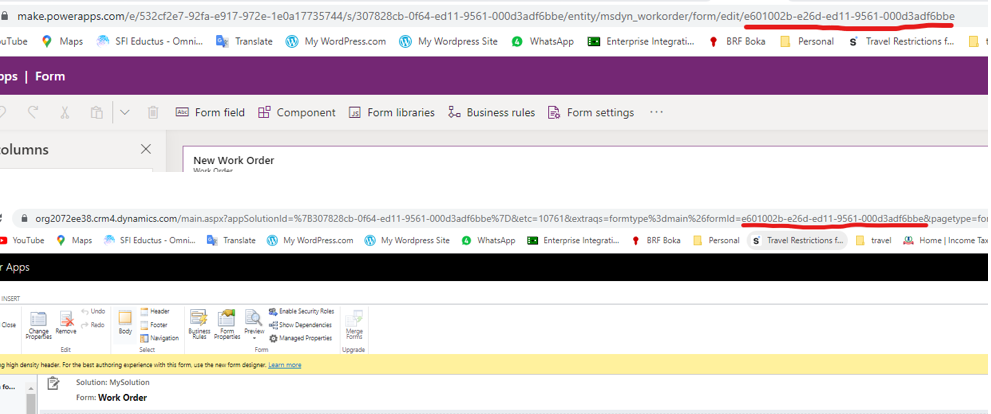
- Now edit the Bookable Resource Booking Main Form, add the lookup field on the form
- Open Classic Form Editor
- Under the field properties >> Go to Controls section
- Add “Form Component Control” as shown below
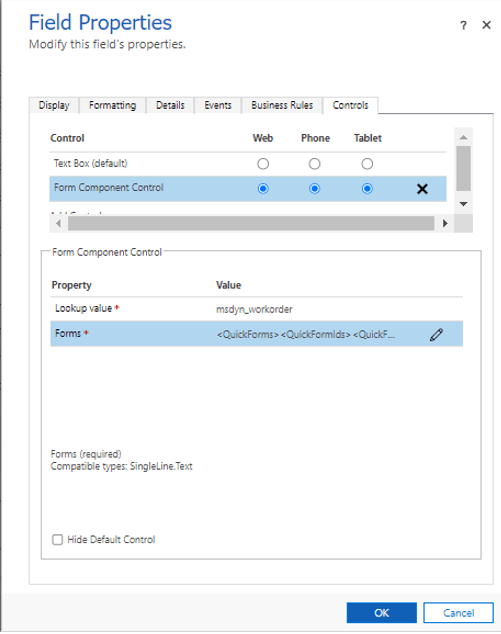
- Under the “Forms” setting update a Static value in the
<QuickForms><QuickFormIds><QuickFormId entityname=”msdyn_workorder”>FORM_ID</QuickFormId></QuickFormIds></QuickForms>
In our case FORM_ID is “e601002b-e26d-ed11-9561-000d3adf6bbe”

- After saving the changes and publishing them, review the changes as in the below clip – The “Customer” tab shows old WO form and the “Work Order” tab shows new form that we created above.
Review the final clip showcasing the way to display editable forms from within the D365 entity forms…
CAUTION : We can definitely have use case for this feature however it comes with its caveat. It impacts the performance of your web page. In the above example I have copied the Work Order form with all the controls in it which is extreme. Hence use it cautiously with only limited fields to serve smaller purposes. Please review the below differences in terms of performance with or without loading Form Component –

Hope this helps!!
 Power Platform